Your SEO is working if more people see you on Google each month, more of them click, and more of them get in touch. All of that is free to check. Google Search Console shows the searches you appear in and the clicks you get. Your Google Business Profile, the free listing that puts you on Google Maps, shows the calls and direction requests. Half an hour a month covers it.
Googling your main phrase won't tell you. You show up for hundreds of searches at once. Your position in each one changes daily. And Google tailors your own results to you. Look at the trend instead: this month against last month, and against the same month last year. If impressions, clicks and enquiries are all rising over three months or more, it's working. That's true even if you're not top for the phrase you keep checking.
Below is where each number lives, how to read it, and what to do when one isn't moving. It's how we check the sites we build. The examples are real, taken from two clients' case studies: Coppermill Landscapes in Chesterfield and MIW Patios in Derby.
The six numbers to track
Four of these tell you whether your SEO is working: impressions, clicks, enquiries and position. The other two help you work out why, when it isn't.
You rank for hundreds of searches, not one
Plenty of owners we talk to test their SEO by typing one phrase into Google, say "electrician Mansfield", and seeing where they come. But your site isn't ranking for one phrase. It shows up for everything people type that's even loosely related to what you do:
- your service, and your service plus your town
- "[your service] near me"
- "how much does [your service] cost"
- "best [your service] in [your area]"
- your business name, and hundreds of variations on all of these
You'll be near the top for some, on page two for others, and 60th for a few you'd never think to check.
Here's one business on one day. We checked Coppermill Landscapes' main searches on 29 October 2026, searching on a phone in Chesterfield. The map pack is the three businesses Google shows with a map. The normal results are the list underneath.
| Search | Map pack | Normal results |
|---|---|---|
| landscapers chesterfield | 1st | 4th |
| porcelain paving chesterfield | 2nd | 28th |
| resin driveways chesterfield | Not shown | Not in the top 30 |
Same business, same day. First for one search, nowhere for another. So "are we ranking?" never has a single answer, and Search Console shows you the whole list. Coppermill's case study has the full table.
What average position really means
Search Console gives you one average position for the whole site. It trips people up all the time, because it's an average of very different things.
Google takes your highest spot each time you appear in a search and averages them. Appear 100 times in 2nd place and 100 times in 40th, and you average 21st. That sounds like page three. In fact you're near the top for one search and nowhere for the other.
It can also get worse while things get better. When you start showing up for new, harder searches, you usually come in low, at 50th or 60th. Those drag the average down. You're visible in more searches than last month, and the number says you've gone backwards.
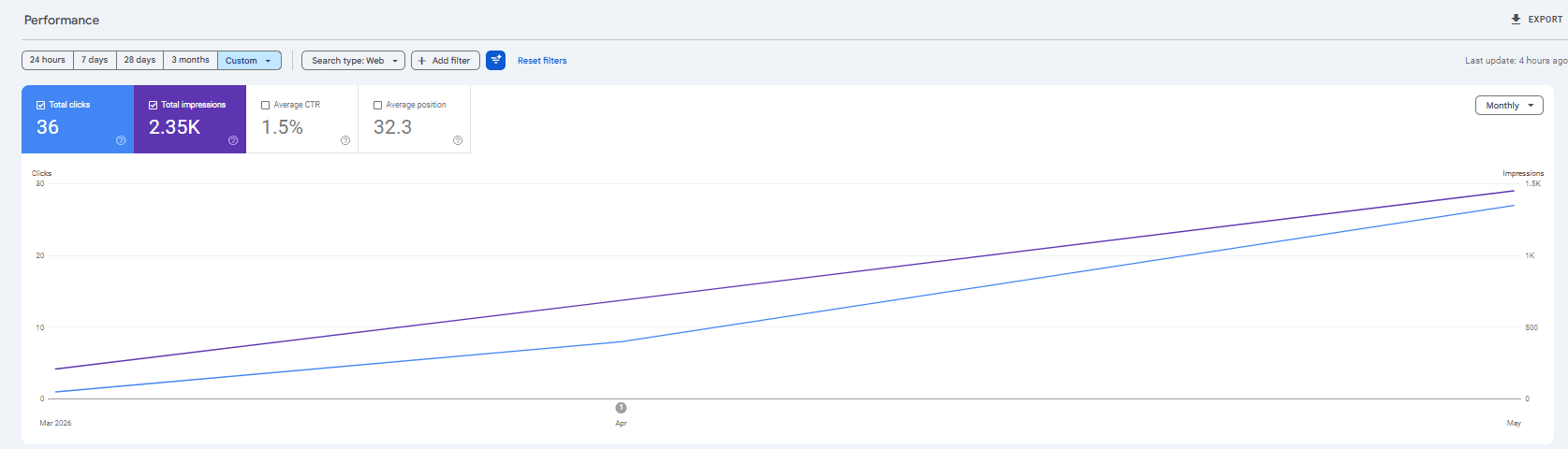
MIW Patios' Search Console, month by month, March to May 2026. Average position reads 32.3, which sounds like page four. Over the same months their clicks went from 1 to 8 to 27, and their first enquiry from Google came in April. The monthly figures are in MIW's case study.
Track your positions search by search, for free
You don't need a paid rank tracker. In Search Console, open Performance, then Search results, and scroll below the chart to the Queries tab. It lists every search you showed up in, with the clicks, impressions and average position for each. Find the searches that bring you work and note their positions once a month. That's your rank tracker, straight from Google.
Watch the months, not the days
Positions and clicks move every day. You can be third for a search in the morning and seventh by the afternoon, with nothing changed on your site. Results shift with who's searching, where they are and what they're searching on.
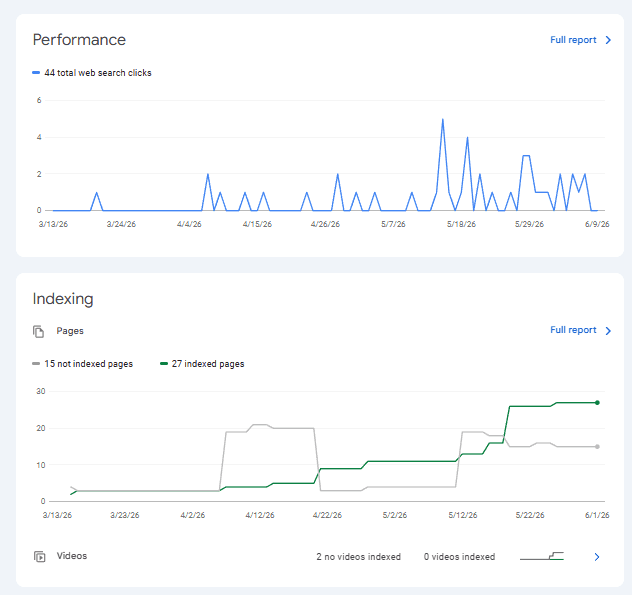
Search Console's overview for another site we look after, March to June 2026. Daily clicks jump between nothing and a handful, which is normal. The green line underneath is the number of pages Google has indexed, meaning stored and able to show in results. In the first few months, that line climbing matters more than any one day's clicks.
So judge a month at a time. Compare this month with last month, and with the same month last year. A lot of trades are seasonal. Coppermill had 1 to 3 enquiries a month from October to December 2025. In March and April 2026 they had 10 and 12. A quiet November tells you about November.
Expect impressions to move first. Clicks come later, sometimes months later.
From August to December 2025, Coppermill's impressions rose from 987 to 4,136 a month. Clicks barely moved, staying between 14 and 18. That usually means you're showing up, but too far down for many people to click. In January 2026 clicks more than doubled to 34. By March they reached 113. Judged in November, it would have looked like the SEO wasn't working.
Search Console: the honest scoreboard
Google Search Console is Google's free report on how your site does in its search results. It's the one to trust, because it comes from Google and it only counts Google searches. Your Instagram, links you text to customers and people typing your web address straight in don't show up here. Every click in it is someone who found you on Google.
Set it up once:
- Go to search.google.com/search-console and sign in with your Google account.
- Add your website as a property.
- Prove you own it, with a DNS record or an HTML tag. Whoever built your site can do this in a few minutes.
- Give it a few days for data to appear.
Then each month, look in three places:
- Performance, then Search results. Clicks, impressions, average click-through rate (CTR) and average position. Set the date to the last 3 months. Then use Compare to set it against the 3 months before, or the same months last year.
- The Queries and Pages tabs, under that chart. Which searches you showed up in, and which pages earn the clicks.
- Indexing, then Pages. How many of your pages Google has indexed, and why any haven't been. A page that isn't indexed can't rank.
Google Business Profile: the calls from the map
Plenty of calls come straight off your Google listing and never touch your website. Search Console can't see those, so check the profile too. Search your business name on Google while signed in, or open Google's Business Profile manager, and click Performance. You'll see:
- calls from the listing
- requests for directions
- clicks through to your website
- how many people viewed the profile, and what they searched to find it
Keep an eye on your number of reviews and your rating while you're there.
Compare the same months year on year. From May to September 2026, Coppermill's profile sent 22 calls, 143 clicks to the website and 248 direction requests. In the same five months of 2025 it sent 2 calls, 22 website clicks and 36 direction requests.
Google Analytics 4: which visits became enquiries
Search Console stops at the click. Google Analytics 4 (GA4), Google's free tool for what visitors do on your site, picks up from there. Three reports are worth your time:
- Traffic acquisition. Look at the Organic Search row: visits from search engines, kept apart from social and direct visits.
- Landing page. The pages people arrive on first.
- Key events. GA4's name for conversions. Set one up for a form sent and one for a tap on your phone number. Without them you'll see visits and never know which ones rang.
GA4 has a gap. It misses anyone who declines your cookie banner or blocks tracking, so its totals run low. Use it for trends and for which pages work. Keep your own record as well: ask every new enquiry how they found you, and write it down.
- Impressions & clicks
- Average position
- Every search you showed up in
- Pages indexed, and problems
- Visits & engagement
- Landing pages
- Key events: forms and phone taps
- Location & device
What your numbers are telling you
High in the results, but few clicks
If you're in the top five for a search and few people click, they're seeing you and picking someone else. Rewrite that page's title and description, the two lines Google shows, so they say what you do, where, and why you. Google's AI answers now sit above many results and take some clicks first (what that looked like for MIW). So compare against your own past months, not a target figure.
Clicks up, phone still quiet
People are arriving and leaving without getting in touch. That's the website, not the SEO. Open the page they land on, on your phone. Is your number tappable in the first screen? Does the first line say what you do and where? Here are ten fixes that get more calls from the same visitors.
A sudden drop
Check three things first. Is it the same dip as this month last year? Did anything change on the site, like a rebuild or new page addresses? Does the Indexing report show pages dropping out? If a rebuild changed your page addresses without redirects, sort that before anything else.
Nothing moving after six months
Flat impressions after six months of real work means something's wrong. Check your pages are indexed. Check each service has its own page, written around what people actually search. Check your Google Business Profile is complete and still getting reviews. Find out why before you decide anything.
Your 30-minute monthly check
Block half an hour on the first Monday of each month. Here's where it goes.
Write the numbers in a simple spreadsheet, one row a month. After six months the trend is there at a glance.
Tracking mistakes to avoid
How we report SEO for clients
If we run our local SEO service for you, you get a plain report every month. It says what we changed on your site, and what moved for rankings, clicks and enquiries. If something isn't working, we say so and change it.
Frequently Asked Questions
How long before I can tell if my SEO is working?
Impressions are the first sign, then clicks, then enquiries, usually in that order. MIW Patios in Derby started from nothing in February 2026 and had their first enquiry from Google in April. Coppermill Landscapes' impressions climbed from August 2025, but their clicks only took off in January 2026. Busier markets take longer. Judge it over three months or more, never a single week.
My impressions went up but clicks stayed flat. Is that bad?
Usually not. Early on it means Google is showing you for more searches, but mostly on page two or three, where few people click. As your positions improve, clicks follow. Coppermill Landscapes' impressions rose from 987 to 4,136 a month between August and December 2025 while clicks stayed between 14 and 18. By March 2026 clicks reached 113. It's only a problem if you're already in the top five for a search and still not getting clicks. Then the fix is a better page title and description, not more SEO.
Why did my average position get worse when my clicks went up?
Because you started showing up for more searches. New, harder searches usually come in low, at 50th or 60th, and they pull the site-wide average down even while you're gaining ground. Check positions one search at a time in the Queries tab, and judge the site on impressions, clicks and enquiries.
Why isn't my website top of Google for my main search?
Two things decide where you land: how hard that search is, and how much trust your site has built up. Trust comes from reviews, links from other sites and pages that answer the search well. The busiest searches in your trade are often held by firms that have been at it for years. A newer site wins the easier searches first. In October 2026 Coppermill Landscapes was first in the map pack for 'landscapers chesterfield' but not in the top 30 for 'resin driveways chesterfield'. Each service page has to earn its own place.
Why can't I see my rankings by just Googling myself?
Because Google tailors results to you. Your location, your search history and your visits to your own site all push it higher for you than for anyone else. Use the Queries tab in Search Console for your real positions. For a spot check, search in a private window on your phone, in the area you work. Do it the same way each month and treat it as one reading.
Why do Search Console and GA4 show different numbers?
Because they count different things. Search Console counts clicks on your Google listing. GA4 counts visits once someone lands on your site, and it misses anyone who declines your cookie banner or blocks tracking. The two will never match, and that's fine. Compare each tool with its own history instead of trying to make them agree.
How do I know whether a lead actually came from Google?
Set up key events in GA4 for form sends and phone taps, then check the traffic source on each one. GA4 misses people who decline cookies. So also check the calls in your Google Business Profile, and ask every new customer how they found you. Take their answers with a pinch of salt. People often say Google when they first saw your van, then searched your name later. Put the three together and you'll be close.
Do I need to pay for an SEO tool like Ahrefs or Semrush?
Not when you're starting out. Search Console, GA4 and your Google Business Profile are free and cover the numbers that matter for a local business. Paid tools charge monthly. They earn it when you're tracking lots of keywords across a wide area, or researching competitors in depth. Start free, and pay only when you hit the limits.